
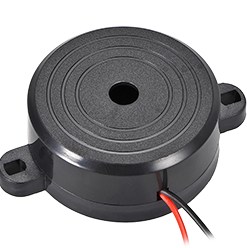
Beep Music Converter
Beep Music Converter is an Unraid container that converts MP3 or WAV files into PC beep speaker commands, letting users play startup or shutdown tunes on…
Platform availability
Available on 1 of 10 platforms
- Unraid
- TrueNAS (not listed)
- Umbrel (not listed)
- ZimaOS (not listed)
- Proxmox (not listed)
- Helm (not listed)
- Mac (not listed)
- Windows (not listed)
- Linux (not listed)
- Any server (not listed)
Health score?A 0-100 score computed nightly from four factors: maintained (40%: recent commits and steady activity), popular (25%: GitHub stars, log scale), easy to install (20%: platforms, install notes, setup guides, Docker image) and light to run (15%: minimum RAM, ARM support). When the source code has been checked, a fifth factor, security check (20%: automated scan for committed secrets, unsafe desktop-app settings, known-vulnerable dependencies and project hygiene; any serious finding caps it at 20), is added. Factors without data are left out and the rest are rescaled.
30/100 Low
- Maintained
- 0last commit 1952 days ago
- Popular
- 2517 GitHub stars
- Easy to install
- 351 install platform, install notes, Docker image
- Light to run
- 502 GB minimum RAM
- Security check
- 75no serious findings
Availability: platform listings confirmed today, links checked 35 days ago
- GitHub stars
- 17
- Open issues
- 3
- Last commit
- 2021-07-18
- Activity
- stale
Checked 10 days ago - source: GitHub (SpaceinvaderOne/Beep-Music-Converter)
Resources & Compatibility
Minimum requirements: 2 GB RAM, 2 CPU core(s), 512 MB disk. ARM (e.g. Raspberry Pi) is not supported.
Checked 54 days ago - source: Docker Hub image tags and published docs
First-install notes
- Installation and hardware Install the template from Unraid Community Applications, choose a conversion mode, and place an MP3 or WAV file in file_to_convert; the generated script appears in converted_wavs, and a physical PC beep speaker must be connected to the server. source
Fetched 38 days ago - each note links to its source
Variants
Alternatives
No alternatives collected yet.
Common questions
Where should the input audio file be placed?
Place the mp3 or wav file in the file_to_convert folder inside the container's appdata folder.
What does the default conversion process do?
It converts the source file to a 16-bit WAV file using sox, then passes it to wavtobeep to create beep code.
Why might the converted tune not make a sound?
The server needs a PC beep speaker for the generated beep code to be heard.
Answers sourced from github.com, github.com
Community
- What software is being using to obtain music files? - Reddit (reddit)
- r/selfhosted on Reddit: My automatic music downloading, archiving, and ... (reddit)
- Looking for automated audio conversion : r/selfhosted - Reddit (reddit)
Collected 48 days ago - public community threads